This is a complete step by step guide on how to convert your money to Bitcoin for the purposes of gambling online (although the same steps can be taken if you are interested in sports betting or playing poker as well.)
It might take a little bit of time to get used to but once you do, it’ll make playing at an online casino much more hassle free and seamless.
So without further ado let’s dive right in!
สำหรับท่านที่กังวลเกี่ยวกับ กฎหมายของสหรัฐฯ ที่คลุมเครือ, the anonymous nature of bitcoin provides an extra layer of comfort.
Unlike regular fiat currency, your personal information is not tied to the transactions you make via Bitcoin so there is no trail that can identify what you purchased.
Furthermore, bitcoin is not regulated or produced by any government or financial institution so it is impossible to have your funds seized or frozen.
ไม่มีค่าธรรมเนียมการทำธุรกรรม
เนื่องจากธุรกรรม Bitcoin ไม่ได้รับการประมวลผลโดยธนาคารหรือตัวกลางทางการเงิน คาสิโนออนไลน์จึงไม่เรียกเก็บค่าธรรมเนียมการโอนเงินสำหรับการฝากและถอนเงินด้วย Bitcoin ด้วยการลดค่าธรรมเนียมและช่วยให้คุณเก็บเงินของคุณไว้ได้มากขึ้น Bitcoin จึงแก้ไขปัญหาใหญ่บางประการที่เกิดขึ้นเมื่อฝากและถอนเงินสกุลเงินทั่วไปหรือสกุลเงิน fiat ไปยังและจากคาสิโนออนไลน์นอกชายฝั่ง เช่น โบวาดา และ BetOnline.
While we do think Bovada is the best online casino option for US residents, they charge a whopping 5.9% fee on all subsequent credit card deposits (the first is free)! Even worse, fees increase to 9.9% when making an Amex deposit!
When compared to the alternatives, depositing to Bovada using Bitcoin blows the competition out of the water; for example ไม่มีค่าธรรมเนียมใด ๆ ที่เรียกเก็บโดย Bovada เมื่อทำการฝากเงินผ่าน Bitcoin.
ความเร็วในการประมวลผล
Another avenue where Bitcoin has a dominant advantage over fiat currencies is with payment processing speeds.
If you were to request a withdrawal via check from Bovada (since they don’t do direct bank transfers due to the UIGEA), it could take up to a month to be delivered and even then, there’s still a possibility your bank won’t accept it.
If you were to withdraw using bitcoin instead the transaction process is extremely fast and can take up to 15 minutes.
การซื้อบิตคอยน์จากแพลตฟอร์มแลกเปลี่ยน
เมื่อคุณได้ตัดสินใจที่จะเก็บเกี่ยวผลตอบแทนจากคริปโตเคอเรนซีแล้ว ก็ถึงเวลาที่จะซื้อบิตคอยน์จากตลาดแลกเปลี่ยนคริปโตเคอเรนซีออนไลน์ มีหลายที่ที่คุณสามารถซื้อบิตคอยน์ด้วยสกุลเงินเฟียตได้ ดังนั้นการเลือกของคุณจึงขึ้นอยู่กับความชอบส่วนตัวของคุณ ฉันชอบใช้ ราศีเมถุน และเลือกวิธีการแก้ไขที่เรียบง่ายและลดค่าธรรมเนียมให้น้อยที่สุด แต่อีกจุดเริ่มต้นที่ง่ายอีกอย่างคือ Coinbase.
Most all cryptocurrency exchanges charge transaction fees, but they are usually miniscule compared to the amount you’ll save when avoiding the money transfer fees of online casinos.
เกี่ยวกับค่าธรรมเนียม การใช้ Gemini จะให้กำลังซื้อมากกว่า Coinbase อย่างมีนัยสำคัญ. At face value, the two exchanges appear to have similar rates:
Coinbase takes a minimum conversion fee of 1.49% when buying through a U.S. bank account, while Gemini charges a maximum fee of 1.00%. However, Coinbase also charges all U.S. users an additional 4% fee on deposited amounts (reflected in a higher BTC/USD rate), while bank transfers to Gemini are completely free.
If you want to go with a quicker, more convenient option, you can pay for Bitcoin using a credit/debit card on Coinbase and avoid having to link a bank account, but you’ll be hit with a 3.99% conversion fee alongside the Coinbase deposit ‘base fee’ of 4%. Additionally, you should be aware that some credit card providers may charge additional fees on cryptocurrency purchases.
For visualization purposes, these three options and their fee structures are compared below:
To use Gemini, you will need to create an account, verify your identity, and link a bank account. This took me about a week in late 2017, but Gemini may have become more efficient in their verification process. However, once you have everything set up and verified, using Gemini will be much quicker for future transactions.
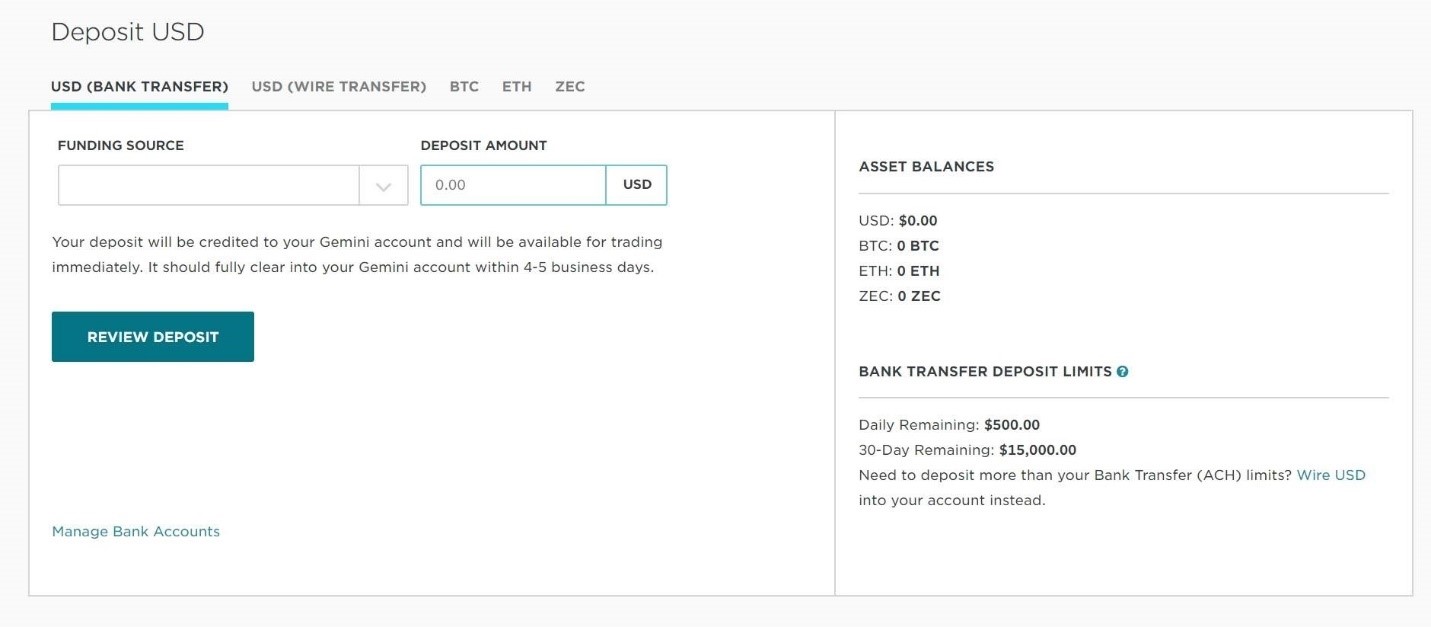
Once you’ve registered and your details have been verified, you will need to deposit funds to your account.
[TRANSFER FUNDS > Deposit into Exchange > USD (Bank Transfer)]
คุณจะต้องเลือกแหล่งเงินทุนของคุณ (บัญชีธนาคารที่เชื่อมโยง) และป้อนจำนวนเงินฝากที่ต้องการเป็นดอลลาร์สหรัฐ จากนั้นคลิกปุ่ม ‘ตรวจสอบการฝากเงิน’.
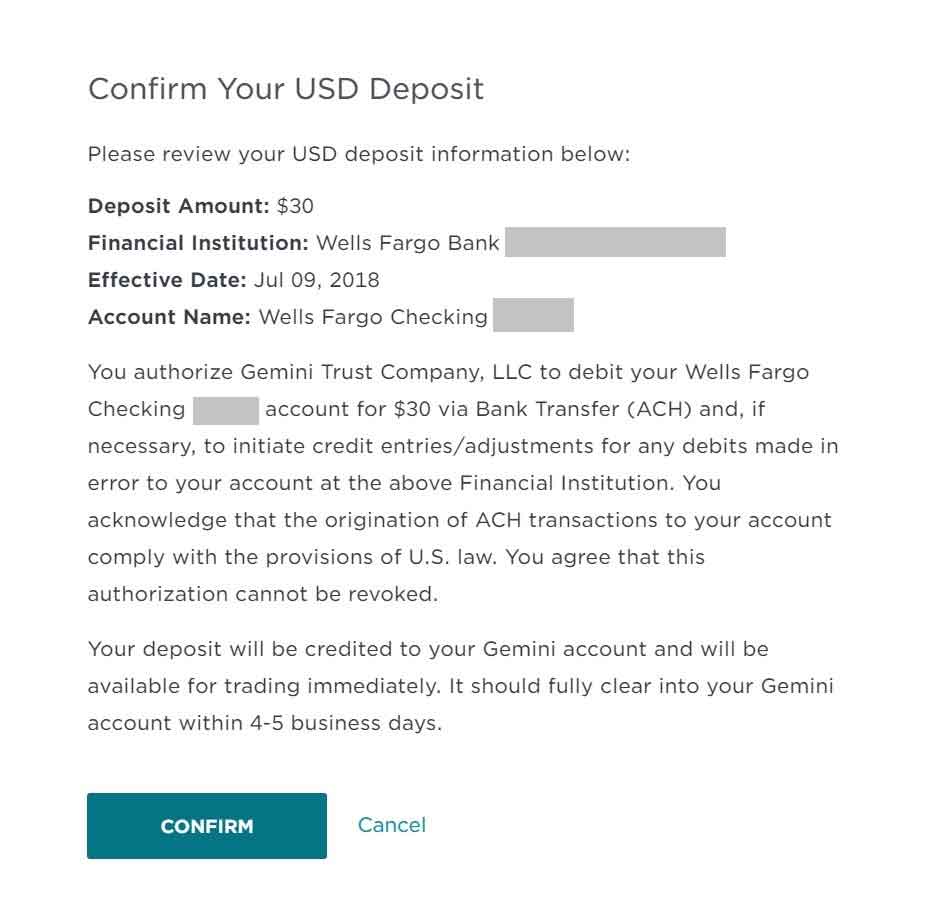
รายละเอียดของคำขอฝากเงินของคุณจะปรากฏขึ้น ตรวจสอบให้แน่ใจว่าข้อมูลทั้งหมดถูกต้อง และกด ‘ยืนยัน’ เพื่ออนุมัติการฝากเงิน USD.
Deposit amounts may be immediately available for trading in Gemini – meaning you are ready to convert USD to BTC. However, funds will typically take 4-5 business days to clear from your bank account to Gemini, and you won’t be able to withdraw BTC to an off-exchange wallet until this occurs.
At this point, I recommend waiting for your funds to clear and then proceeding to purchase Bitcoin or setting a low, limit order that has a chance of being met while you’re waiting. If you’d like to risk the volatile price swings of BTC, however, feel free to exchange USD to BTC, and vice-versa, whenever you please, but be aware that there are 1% conversion fees associated with each trade, and the price of Bitcoin could plummet at any moment.
ซื้อบิตคอยน์บน Gemini
Once funds clear from your bank account to Gemini, it’s time to convert your funds to BTC.
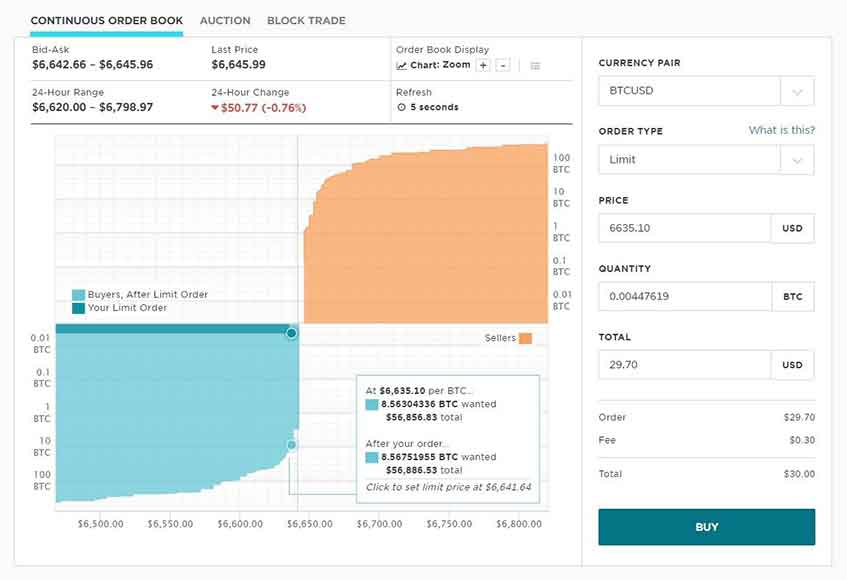
[BUY > BTCUSD]
On the right side of the screen, you will see several variables that determine how your buy order is placed. For the optimal mix of simplicity and value, I recommend placing a ‘Limit’ order, meaning that you will pay no more than the price you enter in the following field. Try choosing a price that is slightly lower than the current going rate, and wait a few minutes for your order to be met.
If you’d like to quickly buy at the current market rate, however, you can place a ‘Market’ order, disregard price and quantity, and simply enter the total amount of USD you wish to convert to BTC; the other fields will be automatically filled in.
When you’re ready, click ‘BUY’.
You will be prompted to confirm your order. Review all the information, and select ‘CONFIRM’ if everything looks good.
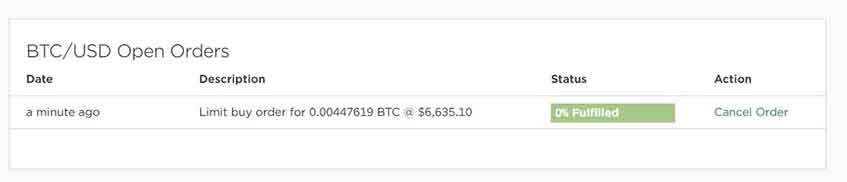
If you scroll down, you can view your order status.
เมื่อคำสั่งซื้อของคุณได้รับการดำเนินการเรียบร้อยแล้ว คุณจะได้ซื้อ BTC สำเร็จแล้ว และถึงเวลาที่จะโอนสกุลเงินดิจิทัลของคุณไปยังกระเป๋าเงินนอกแพลตฟอร์ม.
การโอนบิตคอยน์ของคุณไปยังกระเป๋าเงิน
So, you’ve bought Bitcoin, but it’s still not really yours until you get it off the centralized exchange you bought it from. By leaving your cryptocurrency stored on an online exchange like Gemini or Coinbase, you compromise the security of your funds and lack control. With Bitcoin and other cryptocurrencies, holding the private key associated with your wallet is critical, and exchanges don’t afford that access. But wallets do.
It’s much safer to transfer Bitcoin directly into your own cryptocurrency wallet before using it to make a casino deposit. For more information on why you shouldn’t leave your Bitcoin in an exchange, คลิกที่นี่.
For online gamblers in particular, นอกจากนี้ยังมีความเป็นไปได้ที่บัญชีแลกเปลี่ยนของคุณจะถูกระงับ(especially if you use Coinbase) if they detect you are transferring funds to a casino. You might be thinking “but isn’t Bitcoin anonymous?!”. Well not entirely. If you transfer directly from an identity-linked exchange, like Coinbase or Gemini, they can track whether transactions are going towards an online casino by keeping an eye on the deposit addresses provided.
However if you add the extra step of transferring Bitcoin to your own wallet first, then it is much more anonymous, and no one will be able to tell what products or services you are purchasing with your bitcoin.
การได้รับกระเป๋าเงินบิตคอยน์
A Bitcoin wallet is essentially a software program that gives you total ownership and control of the Bitcoin you just purchased.
Technically it doesn’t store the Bitcoin itself but it stores a private key that is used to identify your ownership of the Bitcoin.
There are multiple types of Bitcoin wallets and mainly come in desktop, mobile, web, and hardware-based forms. There are many options but to keep things simple, we recommend using อิเล็กตรัม ซึ่งฟรี ปลอดภัย และใช้งานง่าย หากคุณมีปัญหาในการติดตั้ง Electrum คุณสามารถเยี่ยมชมคู่มือนี้ ที่นี่
โอน BTC จาก Gemini ไปยัง Electrum
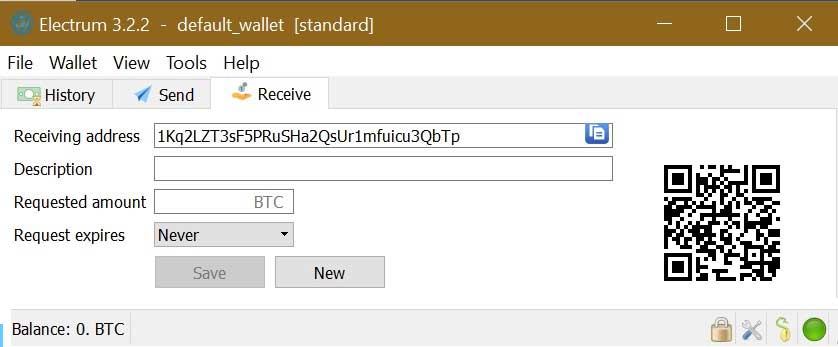
จากกระเป๋าเงิน Electrum ของคุณ จะมีแท็บ ‘รับ’ ซึ่งจะแสดงค่าที่ยาวในช่อง ‘ที่อยู่สำหรับรับ’.
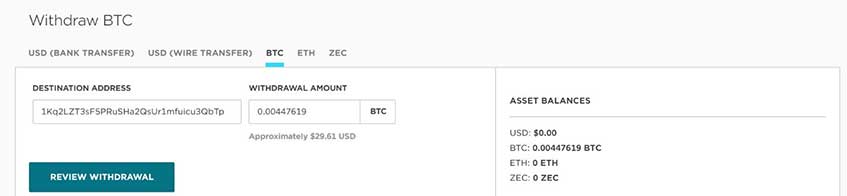
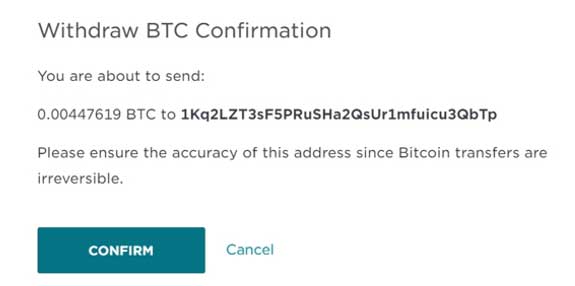
คุณจะใช้ค่านี้ในการส่งบิตคอยน์จาก Gemini ไปยัง ดังนั้นโปรดคัดลอกค่านี้ให้ถูกต้องทุกประการ มิฉะนั้นคุณอาจส่ง BTC ไปยังบุคคลที่ไม่ถูกต้องหรือไปยังที่ที่ไม่มีใครรับได้; ธุรกรรมบิตคอยน์ไม่สามารถย้อนกลับได้.
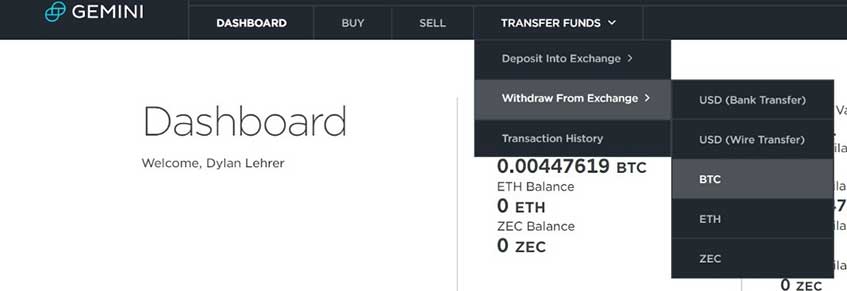
Now, renavigate to Gemini to withdraw your BTC from the exchange and send it to your Bitcoin wallet.
[TRANSFER FUNDS > Withdraw From Exchange > BTC]
จากนั้น ให้คุณนำที่อยู่ที่คุณคัดลอกไว้ไปใส่ในช่อง “ที่อยู่ปลายทาง” แล้วให้กรอกจำนวน BTC ที่คุณต้องการจะส่ง/ถอน เมื่อคุณพร้อมแล้ว ให้คุณคลิกที่ปุ่ม ‘ตรวจสอบการถอน’.
ตรวจสอบให้แน่ใจว่าที่อยู่ของคุณตรงกัน จากนั้นยืนยันการถอนเงิน.
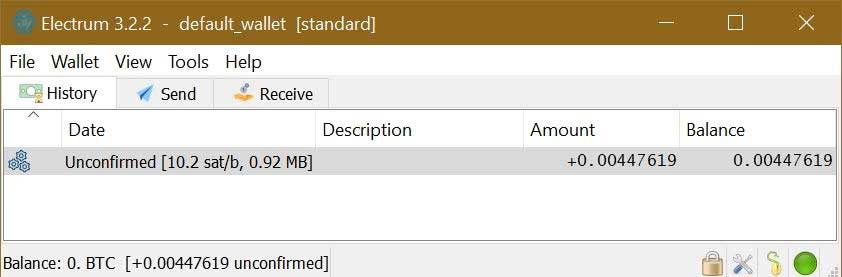
After confirming the transaction, you should now see it appear in your Electrum wallet within minutes.
It will probably be unconfirmed on the Bitcoin network, however, meaning that you will have to wait for more Bitcoin network confirmations before having access to the funds. This process should only take a few minutes. When everything is cleared, you will be notified of the confirmation and ready to deposit your BTC to an online casino.
การฝากเงินเข้าคาสิโนออนไลน์
This is a very similar process to what you just did in the previous step when transferring funds from the exchange to Electrum. However, this time you’re going to transfer from Electrum to the online casino’s wallet address.
First, login to the casino you choose to play at (For the purposes of this tutorial, I am using Bovada, which I recommend for U.S. players).
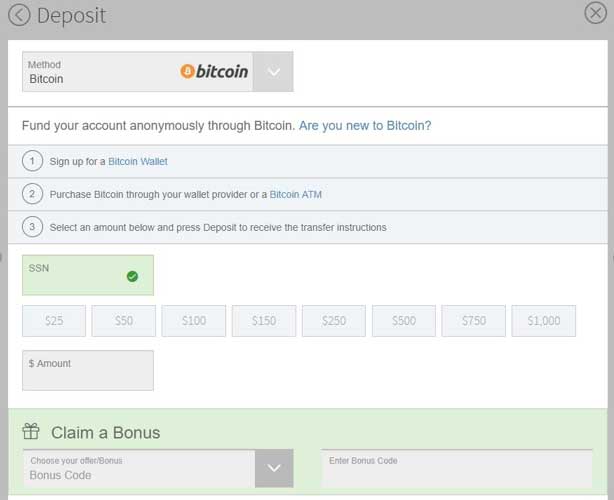
After you are signed into Bovada, click ‘DEPOSIT’ from the upper corner of the site.
Select ‘Bitcoin’ as the deposit method, provide your personal information, and then click ‘SAVE AND CONTINUE’ to verify your identity and activate the payment method.
กรอกจำนวนเงินฝากที่คุณต้องการให้ครบถ้วน และดำเนินการต่อโดยกดปุ่ม ‘ฝากเงิน’ ที่อยู่ด้านล่างของแบบฟอร์ม.
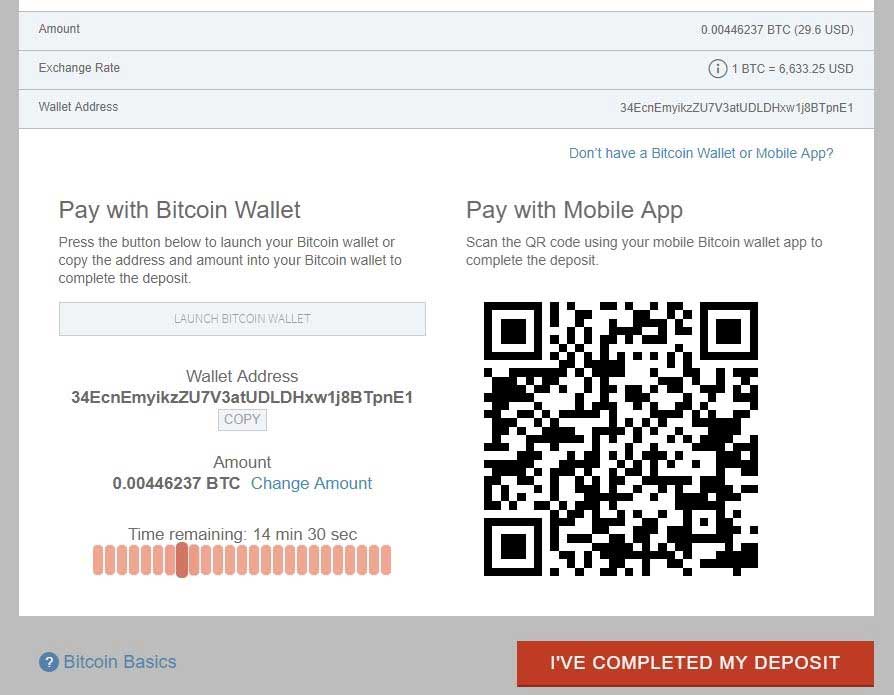
ตรวจสอบข้อมูลทั้งหมดก่อนคัดลอกที่อยู่กระเป๋าเงิน ซึ่งเป็นที่อยู่สาธารณะที่คุณสามารถใช้เพื่อส่ง BTC ของคุณไปยัง Bovada ได้ เมื่อคุณคัดลอกที่อยู่แล้ว ให้เปิดกระเป๋าเงิน Electrum ของคุณและไปที่แท็บ ‘ส่ง’.
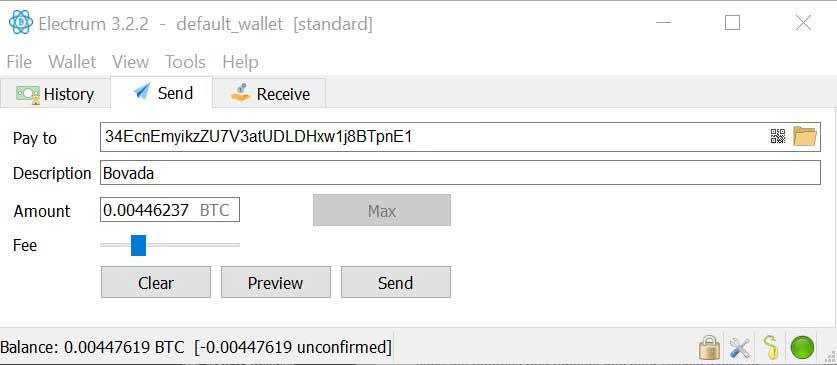
Paste the provided wallet address into the ‘Pay to’ field. Then, input the appropriate amount of BTC and a description if you’d like. You can also adjust the Bitcoin network transaction fee by moving the slider; transactions with higher fees typically process faster, as these fees are what are used to reward Bitcoin miners for adding transactions to their blocks (and effectively confirming them).
You might have to wait a few minutes for enough confirmations to unlock your deposited funds, but funds should be available for use in your Bovada account almost instantaneously.
With your casino account now funded via Bitcoin, you are ready to play!
When it comes time to withdraw your Bitcoin from an online casino, make sure you do it straight back into your Electrum wallet, similar to the way described above.
Request a withdrawal from your online casino using ‘Bitcoin’ as the payment method. On Bovada, you will be asked to provide a wallet address, your mother’s maiden name (oddly enough, the only security option available), and a withdrawal amount.
If you are unsure of your wallet address, you can open Electrum, and navigate to the ‘Receive’ tab. Your wallet address will be shown in the ‘Receiving address’ field; copy this for later.
Back at the online casino, enter all appropriate information, using your Electrum wallet address as the withdrawal destination.
ทำ ไม่ใช่ ถอนเงินกลับเข้าบัญชีแลกเปลี่ยนของคุณ!
As mentioned previously, it’s possible for exchanges to detect withdrawals from casinos, and they can potentially close your account down.
As such, you should always be making deposits and withdrawals from your personal Bitcoin wallet.
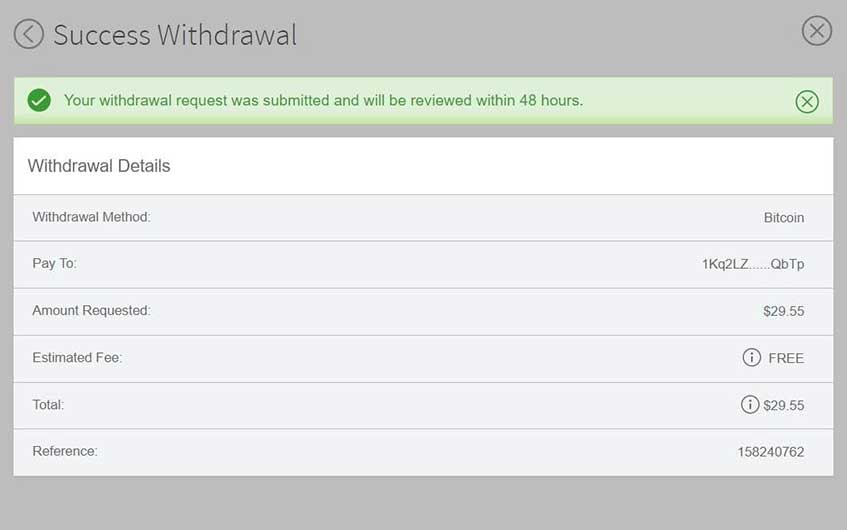
When you’re ready, request the withdrawal. You will see confirmation of your request.
At this point, you may need to wait up to 48 hours for Bovada to approve your withdrawal request and actually send BTC to your Electrum wallet address.
You should receive a confirmation email when the BTC withdrawal is approved and officially sent by Bovada. When the time comes you should be able to see that the appropriate amount of BTC has arrived in your wallet.
การแปลง BTC ของคุณกลับเป็นสกุลเงินเฟียต
At some stage, you may want to convert your Bitcoin back into fiat currency, which involves using an exchange like Gemini or Coinbase, as we have used so far in this guide. Converting BTC back into fiat currency pretty much follows the reverse process of converting fiat currency into BTC.
You can easily do this by transferring BTC from your wallet to an exchange, selling BTC for USD, and then transferring USD to your bank account, but be aware that further fees are charged on each transaction: 1% on Gemini, and 1.49% on Coinbase.
If you’re looking to reduce fees, you can try registering for Coinbase Pro (which used to be called GDAX), which is a cryptocurrency exchange that allows you to sell Bitcoin to USD on the market without transaction fees.
After you request a USD withdrawal on any exchange, it should take a few days for funds to process and reach your bank account.
สรุป
ดังนั้นโดยสรุปกระบวนการสำหรับ การฝากเงินเข้าคาสิโนออนไลน์ คือ:
บัญชีธนาคาร แลกเปลี่ยน กระเป๋าสตางค์ คาสิโน
ถึง ถอนเงินออกจากคาสิโน กระบวนการคือ:
คาสิโน กระเป๋าสตางค์
ถึง โอนเงินกลับเข้าบัญชีธนาคารของคุณ กระบวนการคือ:
กระเป๋าสตางค์ แลกเปลี่ยน บัญชีธนาคาร
It’s a finicky process, but hopefully you’ve been able to get through it without any problems. It’s definitely the best way – especially for US players – to get your money in and out of a casino.
If you’re stuck on any of the steps or have suggestions on how we can improve this guide, leave a comment below.

















คู่มือนี้มีประโยชน์และเข้าใจง่ายมาก แต่เขียนไว้เมื่อหลายปีก่อน.
คุณยังแนะนำ Gemini และ Electrum อยู่หรือไม่? ฉันเคยใช้เพียงครั้งเดียวในการฝากและถอนเงินที่คาสิโนออนไลน์ (ผ่าน Coinbase) เมื่อหลายปีก่อน ดังนั้นฉันจึงไม่ค่อยสบายใจกับคริปโตมากนัก ความง่ายในการใช้งานและค่าธรรมเนียมต่ำเป็นสิ่งสำคัญที่สุดสำหรับฉัน ขอบคุณมากค่ะ/ครับ.
มันนานมาแล้วที่เราอัปเดตคู่มือนี้ แต่หลักการยังคงเหมือนเดิมมาก ๆ คริปโตยังไม่ได้ปรับปรุงให้ดีขึ้นในแง่ของความใช้งานง่าย ดังนั้นฉันเข้าใจว่ามันอาจดูน่ากลัวในตอนแรก.
Electrum ยังคงค่อนข้างดีแต่ก็อาจจะทำให้สับสนได้บ้าง ทุกวันนี้ ฉันใช้กระเป๋าเงินแบบฮาร์ดแวร์ เช่น. Trezor ซึ่งปลอดภัยกว่าเล็กน้อยเนื่องจากคริปโตของคุณถูกเก็บไว้แบบออฟไลน์และมีความเสี่ยงต่อภัยคุกคามด้านความปลอดภัยน้อยกว่า และสามารถเก็บได้มากกว่าแค่ BTC ข้อเสียของการทำวิธีนี้คือต้องเสียเงินในการซื้อฮาร์ดวอลเล็ต.
หาก ไบแนนซ์ มีให้บริการในประเทศของคุณแล้ว นั่นอาจเป็นทางเลือกที่สะดวก เนื่องจากคาสิโนคริปโตจำนวนมากเริ่มยอมรับ BNB (Binance coin) แล้ว คุณจึงสามารถฝาก/ถอนเงินได้โดยตรงจากบัญชี Binance ของคุณไปยังคาสิโนได้อย่างง่ายดาย.
ตัวอย่างบางส่วนได้แก่:
ดูเหมือนว่า Coinbase จะทำงานเหมือนบริษัทฟอเร็กซ์ มันเพียงแค่แปลงเงิน USD ของฉันเป็น Bitcoin และฉันต้องการ eWallet เพื่อรับ BTC ได้ Coinbase สามารถแฮ็กเข้าไปใน eWallet ของฉันได้หรือไม่?
ไม่ใช่ เพราะกระเป๋าเงินถูกโฮสต์บนอุปกรณ์ของคุณเอง หากมีอะไรเกิดขึ้น เงินของคุณจะมีความเสี่ยงต่อการถูกแฮ็กก็ต่อเมื่อคุณเก็บไว้บน Coinbase เท่านั้น